Landscaping Job Costing Software (2026 Comparison)
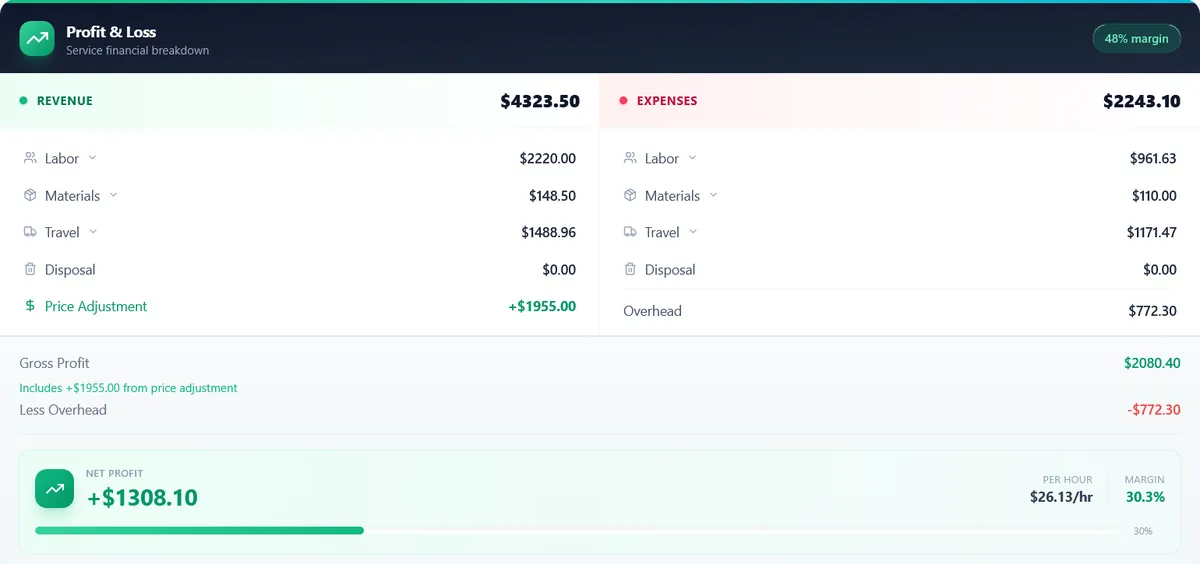
A quote built on wages and materials alone leaves out labor burden, drive time, the truck, and overhead, and every one of those bills arrives whether you charged for it or not. We compared spreadsheets, QuickBooks, FSM platforms, and dedicated landscaping job costing software on the metric that matters: what a job really costs, estimated vs actual, per job. Every price on this page was verified on the vendor's own pricing page in September 2026, and the interactive calculator lets you run your own numbers.
From $47/mo · 14-day free trial · No credit card required
GreenMargins Team
Updated: September 21, 2026

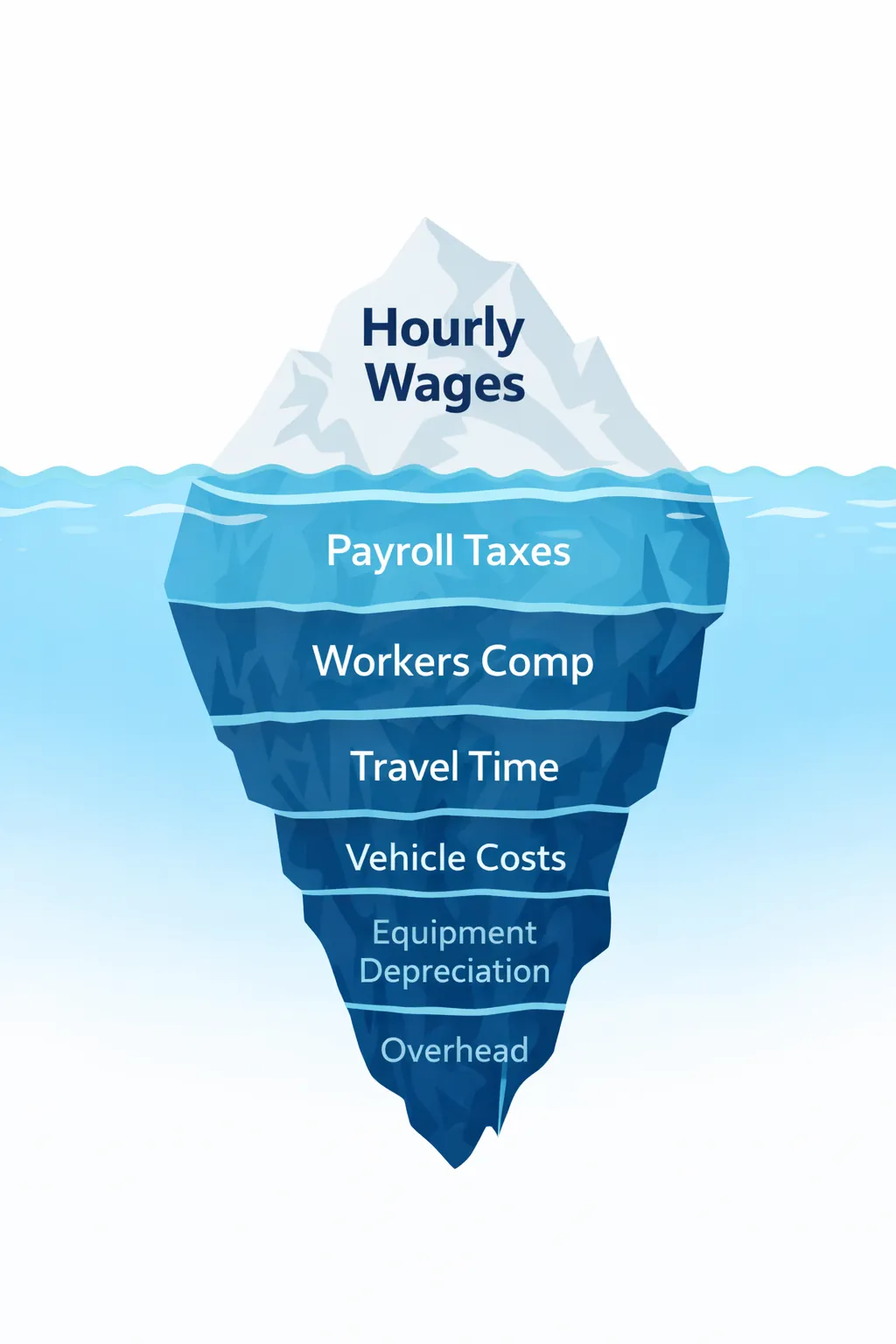
true hourly cost of a $20 wage, costed on this page
IRS business mileage rate, Jul-Dec 2026
true cost of the 3-hour cleanup costed below
/mo, where GreenMargins pricing starts
In This Guide
Quick Answer
Landscaping job costing software calculates what a job really costs (burdened labor, drive time, materials, overhead), shows the margin before the quote goes out, then tracks actual costs against the estimate once the work is done. Spreadsheets can do the math, but nothing updates itself when a wage or fuel price changes, and QuickBooks only sees costs after the money is spent. GreenMargins is built for this loop for crews of 1 to 10, from $47/month billed annually ($59 month-to-month); LMN's Professional tier does real-time job costing for larger companies, and Jobber's Connect plan and up now include job costing alongside its scheduling and invoicing (all verified September 2026).
What Is Landscaping Job Costing Software?
Landscaping job costing software is a tool that calculates the true cost of every landscaping job (including hidden expenses like labor burden, travel time, equipment depreciation, and overhead) so you can see your exact profit margin before you send a quote. Unlike generic accounting software or spreadsheets, job costing software for landscapers is built around the cost lines a landscape job actually has: burdened crew labor, drive time, materials with markup, and overhead.
Job Costing vs Estimating vs Quoting: What’s the Difference?
These three terms get used interchangeably, but they mean different things, and confusing them is how landscapers lose money:
Job Costing
Calculating your true total cost to complete a job: labor burden, travel, materials, overhead, equipment. This is what you need to know to avoid losing money.
Estimating
Creating a price estimate for the customer based on your costs plus a profit margin. Good estimates start with accurate job costing; otherwise you are guessing.
Quoting
Sending a formal price to the customer. A quote is only as accurate as the job costing behind it. GreenMargins handles all three in one workflow.
Tracking Estimated vs Actual Costs on Active Jobs
To track estimated vs actual costs in real time on active landscape jobs, you need software that stores the estimate as line items and lets the crew log hours, materials, and disposal against those same lines while the job runs. GreenMargins, job costing and margin software for landscaping contractors, includes this closeout on every plan: log the actuals, see the variance per line, and the next quote for that service starts from what the last job really cost. LMN Professional and SynkedUP also do real-time job costing, priced for larger operations (verified September 2026).
Here's what that loop looks like on the spring cleanup costed later on this page. The estimate says 6 crew-hours. Suppose the beds run worse than the walkthrough suggested: the crew logs 7 crew-hours, plus a dump run nobody priced:
| Line | Estimated | Actual | Variance |
|---|---|---|---|
| On-site labor (burdened, $26.93/hr) | 6.0 crew-hrs / $161.58 | 7.0 crew-hrs / $188.51 | -$26.93 |
| Materials (mulch, bags) | $45.00 | $52.00 | -$7.00 |
| Disposal (dump run) | $0.00 | $12.00 | -$12.00 |
| Margin on the $396.48 quote | $102.79 (25.9%) | $56.86 (14.3%) | -$45.93 |
One job, that's tuition. Ten jobs with the same pattern, that's a pricing problem you can fix: the next cleanup gets quoted at 7 crew-hours (3.5 clock hours for the 2-person crew) with a disposal line, and the margin you planned is the margin you keep. A spreadsheet can hold the estimate; it can't chase your crew for actuals or roll last month's variances into next month's quotes. The feedback loop is the product.
Where Your Money Actually Goes on a Landscaping Job
This interactive chart shows an illustrative $1,500 landscaping job with a modeled cost split, rounded for readability (not a survey; your mix will differ). Hover or tap each segment to see the details.
If the chart does not load, view the static version.
Hover or tap a segment in the chart to see the cost breakdown.
Job Costing Software for Landscaping: A Side-by-Side Comparison
Here's how the five most common options for landscaping job costing stack up for US contractors in 2026, from free spreadsheets to purpose-built tools. Prices verified on each vendor's public pricing page, September 2026. Where a capability is marked "not advertised," the vendor's public pages did not list it when we checked; take a demo to confirm.
| Feature | Spreadsheets | QuickBooks Online | Jobber | ServiceTitan | GreenMargins |
|---|---|---|---|---|---|
| Price (USD/mo, verified Sept 2026) | Free | $38-340 | From $21 (annual prepaid, promo) | Quote-only | $47-159 |
| Job Costing (actuals vs estimate) | Manual | Plus tier, after the fact | Connect plans and up | Behind a sales demo | ✓ Every plan |
| Built for Landscaping | ✗ | ✗ | Partial (general field service) | ✗ HVAC/plumbing first | ✓ Purpose-built |
| Labor Burden Calculation | Manual formula | Not advertised | Not advertised | Not advertised | ✓ Automatic |
| Travel Cost From the Job Address | ✗ | Not advertised | Not advertised | Not advertised | ✓ Auto via Maps |
| Overhead Allocation Per Job | Manual | Partial | Not advertised | Not advertised | ✓ Automatic |
| Margin Visible Before Quoting | No | After the fact | Not advertised | Not advertised | ✓ Before quoting |
| Invoicing and Payments | ✗ | ✓ | ✓ | ✓ | ✗ Use QuickBooks to bill |
| Best For | Solo operators on a tight budget | Bookkeeping and taxes | Scheduling, CRM, getting paid | Enterprise multi-truck operations | Knowing your real profit before quoting |
Key takeaway: the FSM platforms have closed part of the gap. Jobber's Connect plan and up now include job costing, and QuickBooks Plus tracks project profitability (both verified September 2026). What none of them shows is the margin before the quote goes out, built from burdened labor, drive time from the address, and your overhead rate. That pre-quote view is the specific job GreenMargins does.
See your profit before you send the quote
GreenMargins calculates labor burden, travel time, materials, and overhead automatically. From $47/mo · 14-day free trial.
Landscaping Job Costing Software Reviews (2026)
We compared the most commonly used tools for landscaping job costing against each vendor's own public pages, September 2026. Here is an honest look at each one: what it does well, where it falls short, and who it is best for.
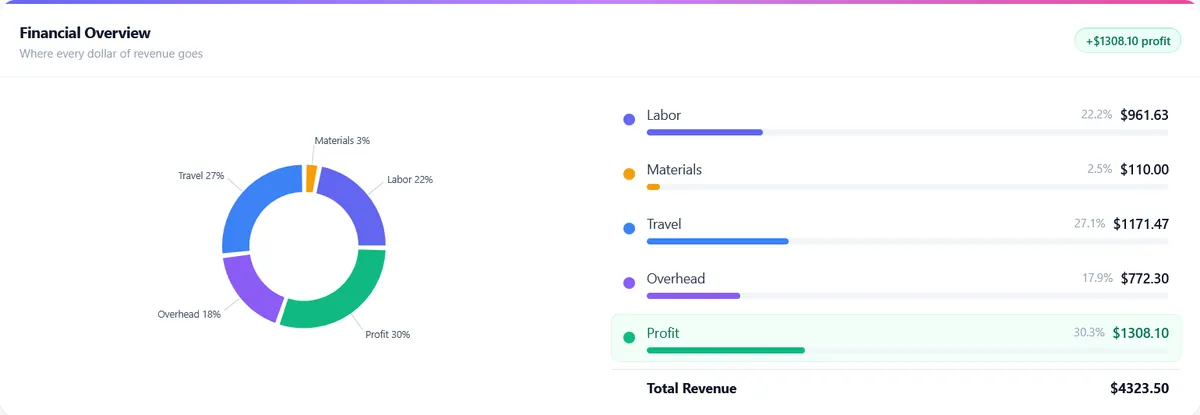
GreenMargins shows your exact profit margin before you send the quote.
The six tools at a glance
| Tool | Price (verified Sept 2026) | Job costing | Built for landscaping | Best for |
|---|---|---|---|---|
| GreenMargins | From $47/mo annual ($59 m2m) | Every plan, estimated vs actual | Yes | Crews of 1 to 10 wanting margin before quoting |
| Jobber | From $21/mo (annual prepaid promo) | Connect plans and up | Partial (general field service) | Scheduling, dispatch, invoicing |
| LMN | $297-648/mo plus onboarding fee | Real-time on Professional | Yes | Companies at or past ~10 employees |
| SynkedUP | $399-599/mo ($359-539 annual) | Both plans, real-time | Yes | Estimate-to-invoice in one system |
| QuickBooks Online | $38-340/mo | Plus tier, after the fact | No | Bookkeeping and taxes |
| ServiceTitan | Quote-only, no published rates | Behind a sales demo | No (HVAC/plumbing first) | Enterprise multi-truck operations |
GreenMargins
From $47/month · 14-day free trial · No credit card required
GreenMargins is a dedicated job costing and quoting tool built for landscaping contractors. Every screen is organized around one question: “Will this job make me money?”
Strengths
- ✓ Automatic labor burden calculation (set once, applied to every quote)
- ✓ Travel cost computed from the real job address via Google Maps
- ✓ See your profit margin before you send the quote to the customer
- ✓ AI voice intake: dictate the job recap, get a draft quote priced from your own catalog (the AI never sets prices)
- ✓ Closed-loop tracking on every plan: compare quoted vs actual costs after the job
Limitations
- ✗ No invoicing, billing, or customer payments (export quotes; use QuickBooks to bill)
- ✗ No payroll, employee timesheets, or client messaging
- ✗ Newer platform with a smaller user community than established FSM tools
Best for: Landscaping and lawn care crews of 1 to 10 who want to know their real profit on every job before quoting. Past roughly 5 office staff or 15 field crew, look at LMN instead.
Jobber
Core from $21/mo annual prepaid (promotional rate at verification); Connect $70, Grow $105, Plus $280; +$29/mo per extra user · verified September 2026
Jobber is a field service management (FSM) platform popular with landscapers for scheduling, dispatching, invoicing, and CRM. It handles the operational side of running a landscaping business well, and its Connect, Grow, and Plus plans now include job costing. The entry Core plan does not.
Strengths
- ✓ Excellent scheduling and dispatch with route optimization
- ✓ Built-in invoicing and payment processing
- ✓ Client hub with online booking
- ✓ Job costing included on Connect and up (verified September 2026)
- ✓ Transparent per-user pricing: extra users are $29/mo on every plan
Limitations
- ✗ Labor burden and drive-time costing are not advertised on its public pages
- ✗ No overhead allocation per job advertised
- ✗ Profit visibility is on the job record, not a margin check before the quote goes out
- ✗ Job costing requires Connect or higher; the 1-user Core plan goes without
Best for: Landscapers whose main need is scheduling, dispatch, invoicing, and getting paid. If that is you, Jobber is the right call, and GreenMargins is the add-on for pre-quote margin math, not a replacement.
ServiceTitan
Quote-based pricing; no dollar figures published (checked September 2026)
ServiceTitan is an enterprise-grade FSM platform originally built for HVAC and plumbing, now expanding into landscaping. It is the most feature-rich option on this list, and it does not publish prices: its three tiers (Starter, Essentials, The Works) all sit behind a "Request Pricing" button. Best suited for larger operations that need dispatch, call tracking, marketing attribution, and payroll in one system.
Strengths
- ✓ CRM, dispatch, invoicing, and payroll in one system
- ✓ Call tracking and marketing ROI attribution
- ✓ Pricebook management for consistent pricing
Limitations
- ✗ No published pricing; you cannot budget for it without a sales call
- ✗ Not built for landscaping (designed for HVAC and plumbing first)
- ✗ Landscaping-specific costing (burden, drive time) not advertised
- ✗ Enterprise-scale setup and commitment
Best for: Large multi-truck operations that need enterprise scheduling, dispatch, and payroll in one contract. If you are reading a job costing comparison to protect margin on residential work, this is not your tool.
LMN (Landscape Management Network)
Starter $297/mo (1 office + 5 crew licenses); Professional $648/mo (3 + 15); one-time onboarding fee; no free plan · verified September 2026 on granum.com, LMN's parent company site (golmn.com redirects there)
LMN is one of the few tools designed specifically for the landscaping industry. It includes estimating, time tracking, job costing, and crew management, and its budgeting methodology teaches overhead recovery properly, a concept most competitors ignore entirely. Real-time job costing lives on the Professional tier and up, not on Starter.
Strengths
- ✓ Built for landscaping specifically
- ✓ Includes overhead recovery budgeting
- ✓ Time tracking integration for actual vs estimated comparison
- ✓ Industry-specific training and community (Landscape Academy)
Limitations
- ✗ Priced for established companies: $297/mo minimum plus an onboarding fee
- ✗ Real-time job costing requires Professional at $648/mo
- ✗ Steeper learning curve: the budgeting methodology has to be learned before the tool pays off
- ✗ Aimed at companies under 10 employees only at the Starter tier; the platform assumes office staff
Best for: Companies at or past roughly 10 employees that want deep budgeting methodology and training. At that scale LMN is the honest recommendation over GreenMargins, and we say the same on our FAQ.
SynkedUP
Standard $399/mo ($359 billed annually); PRO $599/mo ($539 annually); $1,000 activation fee on monthly billing, waived on annual; 2 users included, +$20/mo each after · verified September 2026
SynkedUP is a landscaping-specific platform that combines budgeting, estimating, job costing, scheduling, timesheets, and invoicing. Founded by a former landscaping contractor, it covers the workflow from estimate to invoice, with real-time job costing and overhead recovery on both tiers.
Strengths
- ✓ Real-time job costing and overhead recovery on both plans
- ✓ All-in-one: estimating, scheduling, timesheets, invoicing, QuickBooks sync
- ✓ Built by a landscaping contractor who understands the workflow
- ✓ Access to a financial coach comes with the subscription
Limitations
- ✗ $399/mo entry price plus a $1,000 activation fee on monthly billing
- ✗ Only 2 users included; each additional user is $20/mo
- ✗ Automatic drive-time costing from the job address is not advertised
Best for: Established crews ready to run the whole operation (estimate to invoice) in one system and pay accordingly. At $399/mo it competes with LMN, not with entry-level tools.
QuickBooks Online
Simple Start $38, Essentials $85, Plus $140, Advanced $340 per month at standard rates; project profitability tracking starts on Plus · verified September 2026
QuickBooks is the default accounting software for most small businesses, including many landscapers. It handles bookkeeping, invoicing, and tax prep well, and the Plus plan tracks project profitability. What it reports is what a job did cost after the money moved; it cannot build what a job should cost before you quote it.
Strengths
- ✓ Industry-standard accounting and bookkeeping
- ✓ Invoicing and payment processing built-in
- ✓ Tax preparation and P&L reports
- ✓ The default hub: SynkedUP syncs to it directly, and GreenMargins quotes can be billed from it
Limitations
- ✗ No labor burden calculation
- ✗ No travel time costing
- ✗ No overhead allocation per job
- ✗ Profit reporting is after the fact; no margin check before quoting
- ✗ Not designed for landscaping; generic across all industries
Best for: Bookkeeping and tax prep. Many landscapers use QuickBooks for accounting AND a separate job costing tool (like GreenMargins) for quoting.
Quick Verdict
If your main problem is “I do not know if my jobs are profitable until months later,” you need a dedicated job costing tool: GreenMargins for crews of 1 to 10, LMN or SynkedUP past that. If your main problem is “I need scheduling, dispatch, and invoicing,” Jobber is the right call. If you need everything at enterprise scale, ServiceTitan. And if your pricing is already set and working, do not buy software for a problem you do not have; a spreadsheet and discipline beat a subscription you resent. Small crews commonly land on GreenMargins for costing and quoting plus QuickBooks for bookkeeping.
Upload one estimate and see every hidden cost and your true margin. Free, no signup needed. Or start a free trial.
Know your true job costs before you quote · No credit card required
What to Look for in Landscaping Job Costing Software
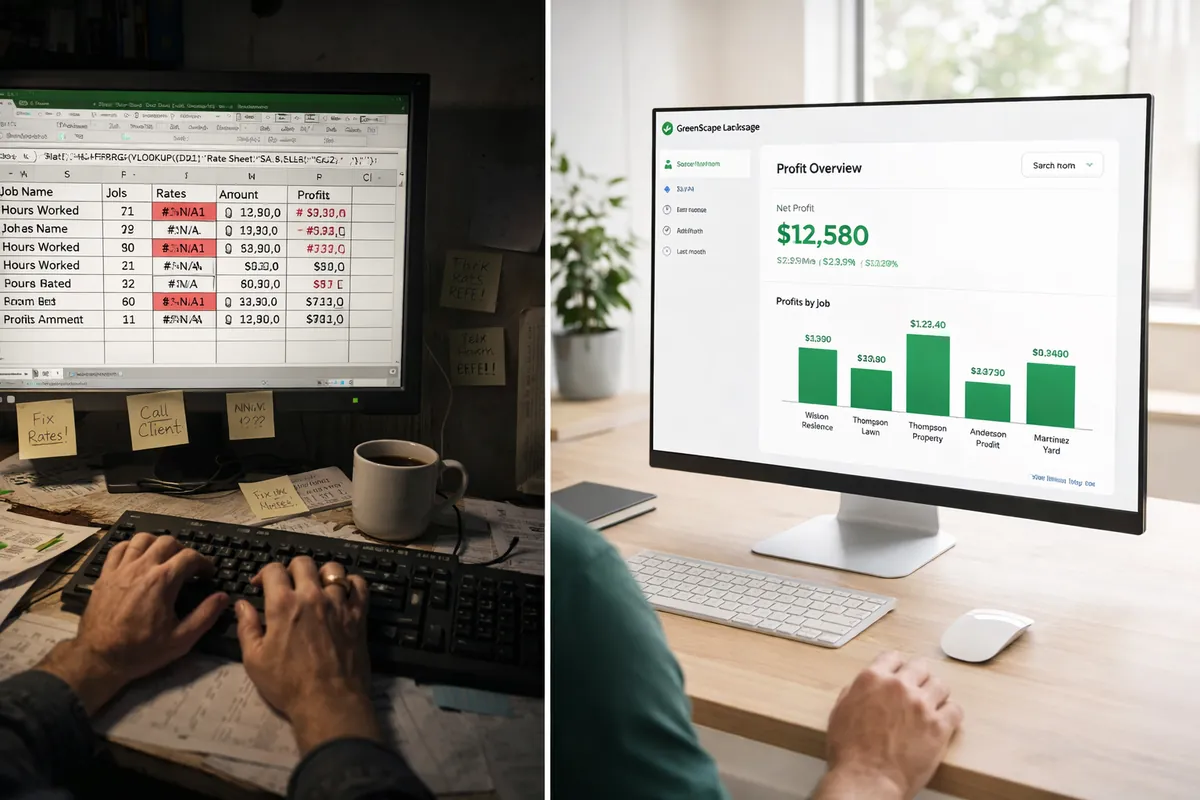
If you're moving off spreadsheet job costing, these are the features that separate software that earns its subscription from shelfware:
Automatic Labor Burden Calculation
Your crew's real cost starts at the wage and climbs: the employer share of FICA (7.65%), unemployment tax, workers comp (the rate depends on your state and class code), liability insurance, benefits, and PTO. Software should calculate this automatically so you see the true cost per hour, not the paycheck number.
Built-in Travel Time Costing
The best tools calculate drive distance and time per job automatically from the address. Your crew gets paid on the drive, so that cost belongs in every quote. In the step-by-step below, a 25-minute drive each way for a 2-person crew adds $44.88 in wages plus $22.80 of truck before anyone unloads a mower.
Overhead Allocation Per Job
Your fixed costs (rent, insurance, admin, software, equipment payments) do not stop just because crews are not working. Good job costing software spreads these across every job proportionally, so each quote covers its share of the overhead.
Profit Visibility Before Quoting
This is the most important feature. You need to see your projected profit margin on each job before you send the quote to the customer, not in a P&L report 3 months later. If the margin is too thin, you can adjust the scope, crew size, or schedule before committing.
Service-Specific Templates
A mulch installation job has different cost drivers than a weekly mowing contract or a hardscape patio build. Look for software with pre-built service templates for common landscaping work: lawn care, cleanups, planting, hardscaping, irrigation, and snow removal.
How to Calculate Landscaping Job Costs (Step by Step)
Whether you use software or a spreadsheet, here's how to cost a job the right way, step by step. It's the same math GreenMargins automates.
Calculate Your Burdened Labor Rate
Start with each crew member's base hourly wage, then add every employer-paid cost. The FICA employer share (7.65%) and FUTA are set by law; the rest below are example rates, and yours come from your own policies:
Base wage: $20.00/hr
+ FICA (7.65%): $1.53/hr
+ FUTA/SUTA (3%, example): $0.60/hr
+ Workers comp (8%, example): $1.60/hr
+ Gen liability (5%, example): $1.00/hr
+ PTO accrual (3%, example): $0.60/hr
+ Health/benefits (8%, example):$1.60/hr
= Burdened rate: $26.93/hr (+34.65%)
Use our free labor burden calculator to figure out your exact rate.
Estimate On-Site Labor Hours
For each service in the job, estimate how many crew members and how many hours on site. Be realistic: pad by 10-15% for setup, breaks, and cleanup. Then multiply:
Labor cost = workers x hours x burdened rate
Example: 2 x 4 x $26.93 = $215.44
Add Travel Time Costs
Your crew gets paid during the drive, and your truck uses fuel. Calculate both:
Travel labor:
= (crew size) x (round trip hours) x (burdened rate)
= 2 workers x (50 min ÷ 60) x $26.93 = $44.88
Vehicle cost:
= (round trip miles) x ($0.76/mile IRS rate, Jul-Dec 2026)
= 30 miles x $0.76 = $22.80
Use our travel time calculator to get exact numbers for any address.
Add Materials at Cost
List every material the job requires with supplier costs. Include delivery fees and sales tax if applicable. Then add your markup separately later; first, you need to know your cost basis.
3 yards mulch @ $38/yd = $114.00
12 boxwood shrubs @ $18 = $216.00
Landscape fabric (50 ft) = $24.00
Delivery fee = $45.00
Materials at cost: = $399.00
Apply Overhead Allocation
Overhead is the line most spreadsheets simply don't have a cell for. Your fixed monthly costs (rent, insurance, admin salaries, equipment payments, software) need to be spread across every job. Calculate your overhead rate:
Monthly overhead: $8,000
Monthly revenue: $60,000
Overhead rate: $8,000 / $60,000 = 13.3%
Apply to this job's subtotal:
($215.44 + $44.88 + $22.80 + $399.00) x 13.3% = $90.72
Use our overhead calculator to find your rate.
Set Your Price and Check Your Margin
Now add up everything to get your true cost. Then set your price and verify the margin is where you need it:
Labor (burdened): $215.44
Travel time: $44.88
Vehicle costs: $22.80
Materials: $399.00
Overhead (13.3%): $90.72
TRUE COST: $772.84
Your price: $1,050.00
Profit: $277.16 (26.4% margin) ✓
We price residential work to a 25-40% gross margin target; the profit margin guide walks through picking yours. If a quote comes out under 20%, reconsider crew size, drive distance, or scope before you send it.
GreenMargins does all 6 steps automatically. Enter the job details, and it calculates burdened labor, Google Maps travel time, materials, overhead, and shows your profit, in seconds instead of hours.
See what one quote is costing you →Try It: Interactive Job Cost Calculator
Enter your numbers below to see the real cost of a landscaping job, including the hidden costs most contractors forget. This is a simplified version of what GreenMargins calculates automatically on every quote.
Your Job Details
Real Cost Breakdown
Assumptions: 34.65% labor burden and 13.3% overhead (the step-by-step rates above), vehicle mileage estimated at 30 round-trip miles per 25 minutes of one-way drive (a 36 mph average), costed at the IRS $0.76/mile rate. Your rates will differ; the free calculators below take your real numbers.
GreenMargins does this math automatically, with Google Maps travel, per-service labor, and real-time profit display.
See what one quote is costing you →Worked Example: Spring Cleanup Job
Here's a real-world example: you're quoting a spring cleanup for a residential property 20 minutes from your shop, 2-person crew, about 3 hours on site. Same crew economics as the step-by-step below ($20.00 base wage, 34.65% burden, 13.3% overhead).
“3 hours, 2 guys, about $200”
True cost + 35% markup
Why Job Costing Matters More in 2026
Costs have not been standing still. The IRS business mileage rate moved twice in 2026 alone: 72.5 cents for January through June, then 76 cents for the second half of the year. A quote priced on last season's numbers is quietly wrong on every line that touches a truck or a wage.
When costs move and your quotes don't, the gap comes out of your margin. In the worked example above, the difference between the $250 gut-feel quote and the $396.48 costed quote is the difference between losing $43.69 and making $102.79 on the same visit. That's a $146 swing on one small cleanup; price 20 of them a season the same way and the illustrative gap tops $2,900. Your jobs are bigger or smaller than this example, but the direction is the same: the quote that knows its costs keeps the margin the other one gives away.
What Accurate Job Costing Surfaces
Modeled examples of the gaps job costing exposes, not customer reviews.

The cleanup that paid $10 an hour
A $350 spring cleanup with a $310 true cost nets $40 for four crew-hours of exposure. Costing it properly and repricing at $475 turns the same visit into real margin. The owner never felt the loss because the truck stayed busy.
Modeled scenario, not a customer review
The 40-minute drive nobody billed
A 2-person crew driving 40 minutes each way at the example's $26.93 burdened rate burns $71.81 in wages per trip, plus about $36.48 of truck (48 round-trip miles at the IRS $0.76 rate), charged to nobody. Once the drive shows up as a line item, jobs past a 25-minute radius need the margin to justify the windshield time.
Modeled scenario, not a customer review
The hardscape bid missing its burden
A patio bid carrying $9,000 of bare wages is short about $3,100 at the example's 34.65% burden rate. On a $15,000 job that's the difference between a profitable month and working for the crew.
Modeled scenario, not a customer review
The Jobber shop that costs in parallel
A crew that schedules, dispatches, and invoices in Jobber but never sees margin until the quarter closes adds a costing layer for quoting. The stack is common because each tool does its own job: Jobber runs the day, the costing tool decides the price.
Modeled scenario, not a customer review
Frequently Asked Questions
Related Guides
What is Better Than Jobber for Job Costing?
Compare Jobber vs dedicated job costing software for landscapers.
Best Quoting Software for Small Landscaping Businesses
Compare the top quoting software options for small landscapers.
Best Alternatives to Spreadsheets for Landscaping
Why landscapers are switching from Excel to purpose-built tools.
Best Lawn Care Pricing Calculator
Compare the top pricing calculators built for lawn care businesses.
How to Know If a Landscaping Job Will Be Profitable
Calculate profit before you quote, not after you have done the work.
How to Price Landscaping Jobs Without Losing Money
5-step process to build profitable quotes every time.
Stop Guessing Your Job Costs
Know exactly what you will make on every landscaping job before you send the quote. GreenMargins calculates labor burden, travel time, materials, and overhead automatically.
From $47/month (US) · 14-day free trial · No credit card required
See what one quote is costing youUpload one estimate and see every hidden cost and your true margin. Free, no signup needed. Or start a free trial.